![janes.jpg]](https://i.janes.com/hs-fs/hubfs/janes.jpg?height=40&name=janes.jpg)
The top navigation refers to the orange bar at the top of the screen. This orange bar will persist as you navigate the site and will allow you to access key pieces of functionality and content.
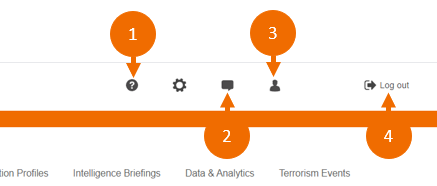
- The “Help” icon will take you to the training page, where you can access help documentation and request training.
- The "Feedback" icon will allow you to send feedback, or ask questions about your Janes subscription direct to the product management team.
- The person icon which will be your account name, is where you can access information about your account and change your password.
- Always use the "Log out" button when exiting the site. This will close down your session properly and securely.

- Home will always return you to the homepage and will clear your search so you can start afresh.
- Access country focused dashboards. This is a great place to start your session as information from across your subscription is consolidated by your chosen country.
- Map gives you access to a geospatial layer that can also be ingested into GIS systems for analysis and integration with related layers.
- Search & Analysis Tools provides access to the Advanced Search option, Explorers, Inventories and Analytics Dashboards.
- Products gives you access to a listing of your subscribed content with quick links to the product homepages. Products can be viewed by Subject, A – Z and saved as Favourites.