![janes.jpg]](https://i.janes.com/hs-fs/hubfs/janes.jpg?height=40&name=janes.jpg)
This section demonstrates the following functionality:
- Auto-fill
- Keyword search syntax
- Multiple words
- Phrases
- Boolean operators
- Excluding words and phrases
- Parentheses
- Proximity
- Wildcards
Auto-Fill
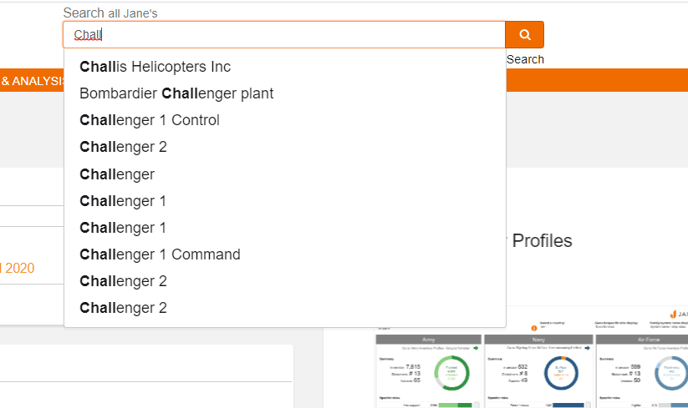
The search facility is a keyword operator which will auto-fill to match commonly searched terms and subject areas. We have used the keyword ‘Challenger’ to demonstrate the capabilities of this simple search function.
Keyword Search Syntax
The keyword search box uses the AND search operator by default, with all individual keywords or quoted phrases entered in the box being considered a search constraint.
Multiple Words
Adding multiple keywords in the box will search for documents containing those keywords anywhere in the text. e.g. tank munitions will search for documents containing tank AND munitions.
Phrases
Phrases can be included in your search by delimiting the keywords you enter with double quotation marks (“ “). e.g. “tank munitions” will search only for instances of the keywords tank and munitions appearing adjacent to each other and in that sequence as a single phrase.
Boolean Operators
Keywords and phrases can be combined into search statements using Boolean operators.
- search text <AND> search text, where search text can be a keyword or “phrase” - when searching for documents containing both keywords / phrases
- search text <OR> search text, where search text can be a keyword or “phrase” - when searching for document containing either keyword / phrase
Excluding Words and Phrases
Keywords and phrases can be excluded from the search results by prefixing them with a not operator (<not>). e.g. <not> tank will search for documents that do not include the keyword tank, and <not> “tank munitions” will search for documents that do not include that phrase.
Parentheses (Operator Precedence)
By default the order of precedence is <NOT>,<AND>,<OR>,<NEAR>, this order should be changed through the use of parenthesis.
- e.g. (SHORAD <OR> "short range air defence") <AND> "United States"
Without the parentheses "short range air defence" will be joined using AND logic to "United States"
Proximity
Keywords or phrases in close proximity to other keywords or phrases can be searched for by using the format – term <NEAR>
- e.g. apache<NEAR> longbow
This option can be configured to operate within a range, by defining how close you want the terms to be “apache <NEAR /5> longbow” when searching for those keywords. If a range is not entered, a range of 4 is applied as a default.
Wildcards
Wildcards may be used to define search strings with variables in order to locate related keyword matches in documents. A wild card string may contain the following special characters –
- Asterisk (*) will expand the scope of your search by representing 0 or more alphanumeric characters at the beginning, middle, or end of the word, eg. Defen*e = Defense, Defence, Defensive, Defendable.
- Question Mark (?) will limit the scope of your search by representing a single alphanumeric character, eg. Defen?e = Defence, Defense. More than one (?) can be used to indicate multiple characters.