![janes.jpg]](https://i.janes.com/hs-fs/hubfs/janes.jpg?height=40&name=janes.jpg)
Once a search has been executed you will be taken to the search results grid. By default results are displayed by relevancy. If you enter a blank search, all documents in your subscription will be returned, with the most recent first.
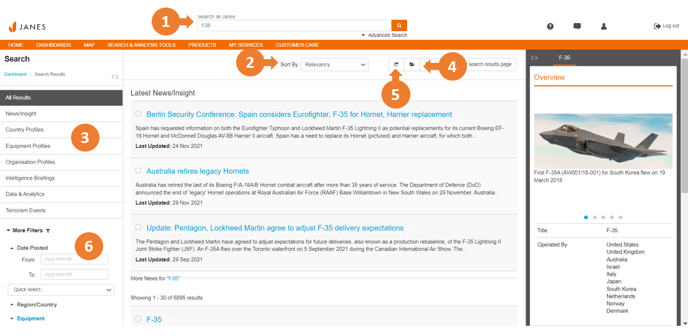
- Start a search by entering a search term in the search box. By default this will search your entire subscription.
- Each search will display results by relevancy by default. Select the drop down menu to change this to Date, Title, Country or Publication.
- Tabs to the left of the page will quickly filter your search by document type such as all results, news only or equipment profiles only.
- Click to save your search so you do not need to re-enter criteria for searches you regularly carry out.
- Click to export your search results.
- Multiple search filters can be added to further refine your search. Expand the filters to view options and click refine results once you have selected your filters.