![janes.jpg]](https://i.janes.com/hs-fs/hubfs/janes.jpg?height=40&name=janes.jpg)
Following selection of the Company Intelligence link, you will land on the following search page:
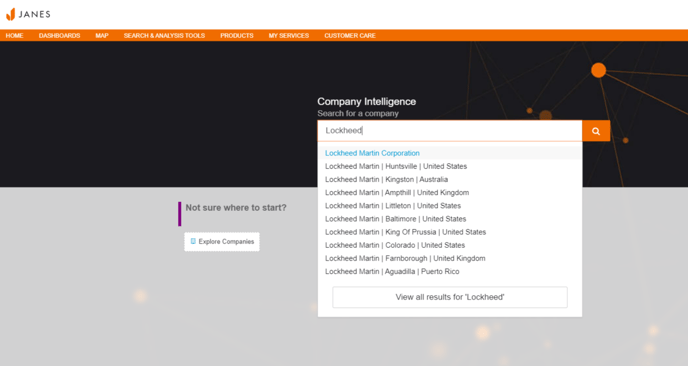
You can either search by typing straight into the search bar. Doing this will enable a suggested list of companies with the HQ or what Janes calls the “Global Ultimate” of the company appearing at the top of the list. Click on the Global Ultimate (GU) to view the most connected information - content rolls up to GU of a company.
Explore Companies
Alternatively, you can click on “Explore Companies” button on the search page to enable a filtered search. This will support broader searches by country, role, sub type (which includes the ability to select the Global Ultimate of an organisation), weapons, systems and platforms.
Once you have selected a company you will automatically land on the profile page of that company.
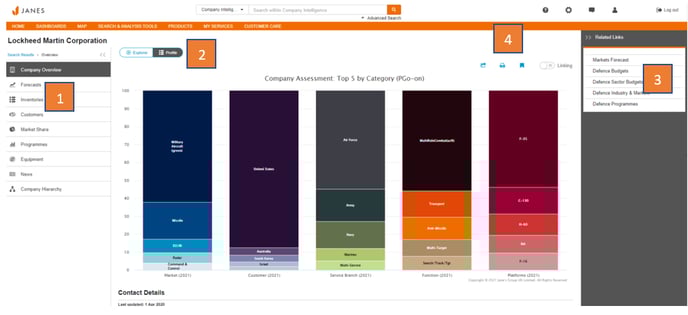
Basic functionality of the Profile Page
- Navigation bar
- Selected forecast, inventories, customers, market share, programmes, equipment and news will enable a filter icon which will allow the user to further focus the results against each of these sections.
- Access to either Profile or Explorer tool view
- Navigate to the products relevant to your search for a deeper analysis. Any filters made in the navigation section will be saved into the product deep dive providing the content sets are aligned e.g. Market share uses Markets Forecast data (the filter would align to this), Programmes to Defence Programmes and so on. This section will also display relevant links and content aligned to your search.
- Standard support buttons
- Export: Allows you to export data from the page you are viewing
- Print: Enables print of page viewing
- Bookmark: Will save the page viewed to your bookmarks listed within “My Services” on the top navigation bar.