![janes.jpg]](https://i.janes.com/hs-fs/hubfs/janes.jpg?height=40&name=janes.jpg)
What is RSS?
RSS (Really Simple Syndication) allows you to conveniently view a number of information sources (e.g. Janes) in one place as soon as they are published, without having to visit the Janes site. These RSS feeds are for subscribers only.
How do I start using Janes RSS feeds?
In general, the first thing you need is something called a RSS reader. This is a piece of software that checks the feeds and lets you read any publications and articles that have been added. There are many different versions, some are accessed using a browser and some are downloadable applications. Some recent browsers even have RSS feeds detection built into them so that when you come across an RSS feed that you want to add, you simply follow the instructions in the browser.
Browser-based news readers let you catch up with your RSS feed subscriptions from any computer, whereas downloadable applications let you store them on your main computer, in the same way that you either download your email using Outlook, or keep it on a web-based service like Gmail.
Setting up an RSS Feed
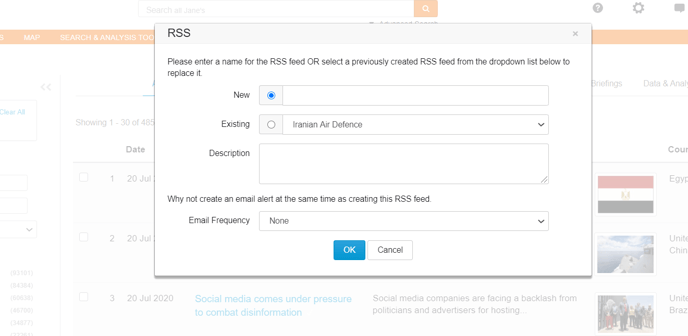
To set up an RSS Feed enter all your search criteria – this can be a combination of keywords, Boolean operators and filters. Once you have selected your search options, click the “RSS” button at the top of the search grid.
Enter your RSS Feed name and description, and select your email frequency.
You will need to have an RSS feed reader installed to view this content.
Accessing Janes pre-determined feeds
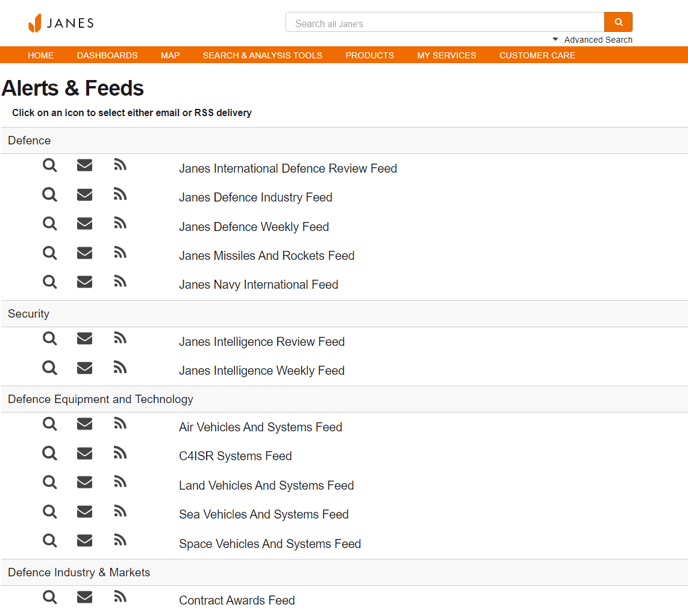
Janes have created a set of standard email alerts and RSS feeds. To set these up go to “My Services” in the top navigation, and select “My Alerts & Feeds”. You will see a list of alerts and feeds on different topics. Click the envelope icon to set up an email alert, and the RSS feed icon to set up an RSS feed.