![janes.jpg]](https://i.janes.com/hs-fs/hubfs/janes.jpg?height=40&name=janes.jpg)
Forecasts reports on the available revenue aligned to the company viewed. All forecasts in Company Intelligence are displayed in USD Millions and with PGo switch on. You will need to conduct a further search into Markets Forecast to adjust Pgo and currency.
P(Go) is the Markets Forecast analyst’s estimate of the probability that the Item forecasted will be funded as described in the record. This factor only applies to the forecast period and only to the expected revenues from those forecasts.
Chart View
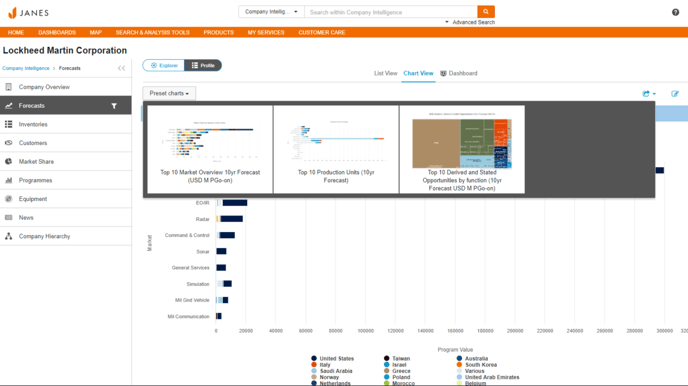
The default view in Forecasts is the Chart view. Click on “Preset charts” drop down to select from the following charts:
- Top 10 Market Overview, 10yr Forecast
- Top 10 production units
- Top 10 derived and stated opportunities
Hovering over each chart with your mouse, will provide additional information. Each chart’s data can be view in “List view” which is also reactive to filter searches. Export chart image and table content using the export button.
List View
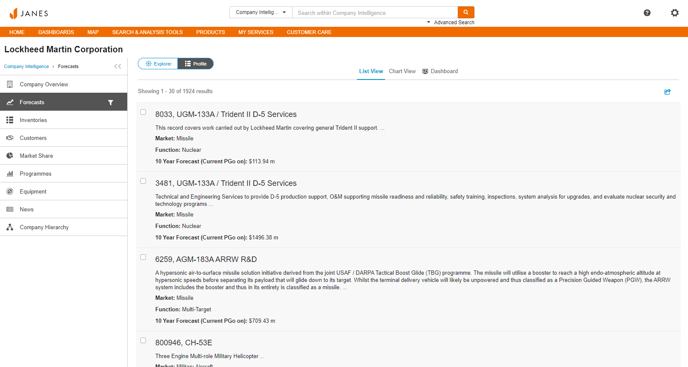
List view displays the data driving the current search and filter. The list is just a summary – to view the complete dataset, download using the export button. This will deliver a highly detailed view of the forecasts.
Dashboard view
The dashboard enables an analytics page fixed to the top 12 listings against Markets, End User Countries, Market Segments and items (product). This page cannot be adjusted using a filter.